









BC.GAME Registration in India
BC.GAME is an online platform where an account is used for sign-in, security settings, and access management. Based on information available in the service’s public sections, the platform is associated with the operator Twocent Technology Limited (company number: 000041939) and indicates licensing by the Government of the Autonomous Island of Anjouan, Union of Comoros (licence number: ALSI-202410011-FI1). Licence status: valid. Licence grant date: 2024-10-02.
Short answer on how to register
Normal flow: enter contact, set password, verify via link or code, log in. A few minutes start to finish when confirmations come through on time. The hang-ups are usually at the verification stage and first login security scan – so make sure the contact info you give is accessible. ID checks might come up afterward, especially following profile changes or if you need account recovery.
After your account is confirmed, review the current bonus terms before using any first-deposit offer.
What to prepare before registration
Minimum data required to create an account
Start with: active email or phone you control, device and browser that can run the service without issues. If verification pops up, be ready to receive codes via text or email fast. Useful to locate Security, Verification, and Help areas in your account beforehand so you can navigate to them easily later.
If you register from a phone, keep the same mobile browser session open until email or SMS confirmation is complete.
Account security at the start
Pick a password you haven’t used before – not the one from email or messengers. Activate whatever protections are in settings, 2FA for example. Verify your confirmed email/phone is right because it handles recovery and security notices. If there are backup codes or extra recovery paths, keep them offline and away from messengers. Enter codes only on legitimate service screens – avoid third-party forms and don’t share codes with anyone, regardless of what they claim.
Step-by-step registration
- Step 1: Open the registration flow
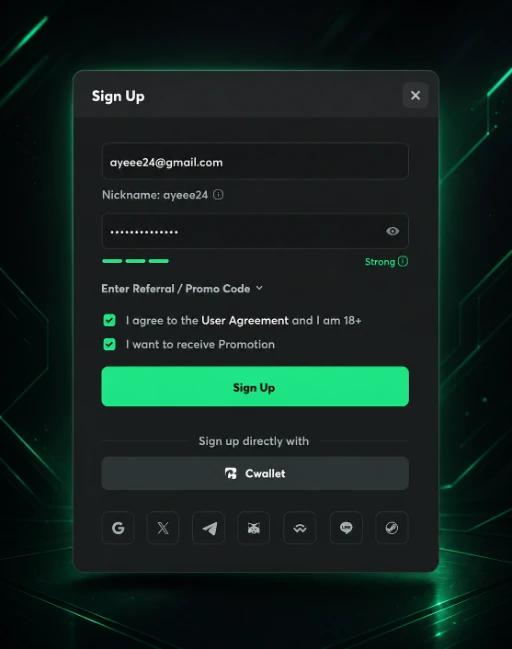
Start account creation from the sign-in/registration interface. Verify that the BC.GAME brand is displayed and that the domain matches the primary domain identifier: bc.game. Check that the connection looks normal and the browser shows no warnings. If you see suspicious redirects, stop and do not enter any data.
- Step 2: Choose a registration method
Pick email or phone signup if both options are there. Only use contact info you can actually get to. Before you move forward, double-check what you typed and the format – most errors come from typos or wrong country code.
- Step 3: Enter contact details
Fill in your email or phone number and confirm it’s right before sending. When they give you an additional recovery option, only provide it if you have reliable access to both contacts. After submission, check that the verification process began – you’ll see either a code entry interface or notification about outgoing email.
- Step 4: Create a password
Set up something that won’t crack easy: enough length, varied characters, skip the obvious stuff. Don’t use passwords from breaches, keep it to yourself. See what the form requires for length and mix.
- Step 5: Confirm your contact method
Confirm your email/phone however the system sends it – code, link, or token. For email, look in Spam and Promotions if nothing shows up. For SMS, give it time since carriers can delay or block messages. Use the newest code if you asked for another one, not the old one.
- Step 6: First login and baseline settings
Get in and open security and recovery settings immediately. Turn on two-factor authentication if you see it, do this before making profile changes. Look for the active sessions/devices section if it’s there and remove what you don’t need. Store backup codes or set up backup recovery when available.
- Step 7: Review profile and access conditions
Confirm your profile is correct and your verified contacts display properly. Check for warnings that require action (for example, email confirmation, added security steps, or document requests). If the interface shows access restrictions or requirements, open the relevant Help/Terms section inside the account and follow the steps listed for your situation.
Identity confirmation and verification
When KYC may be required
KYC can be requested in risk scenarios (unusual logins, key data changes, signs of compromise), during internal checks, and to unlock certain actions or restore access. It may also be required if the system cannot clearly confirm account ownership or needs additional validation of profile correctness. Exact triggers and scenarios are typically described in the Verification and Terms sections inside the account.
What documents are commonly requested
The exact document list and upload format are shown during the verification flow inside the account. In practice, common categories include an identity document (passport/ID card/driver’s licence), proof of address (utility bill, bank statement, official document), and payment method confirmation as requested by the form with sensitive data masked. In some cases, a selfie or video check may be included to match identity if the process requires it.
Before uploading, look at what the interface says it needs: document should be clear, edges visible, all info showing, no glare or dark shadows. If there are file type or size limits, stick to them and don’t compress it too much. Make sure profile data matches the document – name, birth date, address differences usually get rejected or they ask again.
If the platform asks for payment ownership confirmation later, compare the required upload format with the available payment methods before depositing.
Common issues and fixes
Verification code does not arrive
- Cause: delivery lag, email/phone mistake, provider blocking, caught by spam filters.
- Fix: verify contact entered correctly, check Spam section, wait a moment then try again, switch methods if available.
Registration cannot be completed due to a form error
- Why it happens: password not meeting rules, phone format conflict, temporary system issue.
- Fix: manual entry no autofill, refresh browser, try different device/browser, set password that matches requirements shown.
Account is created but login fails
- Cause: wrong password, contact not verified, security block.
- Fix: use password reset, complete contact verification, and review security notices in the profile.
Email is not confirmed
- Cause: message went to spam, link expired, mailbox provider blocks automated emails.
- Fix: request a new email, check Spam/Promotions, and use another email address if needed while keeping access.
Phone number is not accepted
- Cause: incorrect format, unsupported prefixes, SMS delivery limitations.
- Fix: check country code and formatting, remove spaces/dashes, and try email registration.
KYC is requested immediately after registration
- Cause: security checks triggered, data mismatch, internal control requirements.
- Fix: open the verification section, follow the document list shown in the interface, and ensure images are clear and match the profile.
KYC documents are rejected
- Cause: blurry images, cropped edges, name/date mismatch, expired document.
- Fix: upload higher-quality images, ensure data matches the profile, and use a valid document.
Account is temporarily restricted after changing details
- Cause: protective lock after changing email/phone/password.
- Fix: re-confirm the contact method, complete any additional checks, enable 2FA, and review login history if available.
Unable to enable 2FA or link a verification method
- Cause: temporary issue, setup requirement mismatch, session conflict.
- Fix: refresh, retry in the Security section, sign out and sign back in, then try another method if offered.
Account locks after multiple failed login attempts
- Cause: protection against password guessing or suspicious activity.
- Fix: stop repeated attempts, use password recovery, check the device for malicious extensions, and enable 2FA after access is restored.
Suspected third-party access
- Cause: leaked password, phishing, malicious browser extension.
- Fix: change the password immediately, sign out from all devices if available, enable 2FA, and contact support (support channels: live chat, email [email protected]).
Requirements and status table
| Element | Why it is needed | Where it is entered | Possible reasons for refusal | What to do |
| Identification and access recovery | Registration form / Profile | Typos, inaccessible mailbox, email blocks | Correct email, confirm it, check Spam | |
| Phone number | Confirmation and security | Registration form / Profile | Wrong format, SMS not delivered | Check format/country code, try email |
| Password | Access protection | Registration form / Security | Weak password, rule mismatch | Create a unique password per form hints |
| Verification code | Confirms control of contact method | Registration flow | Expired code, wrong code, delivery delay | Request a new code, wait, re-check contact |
| 2FA | Reduces account takeover risk | Security | Setup not completed, session conflict, temporary issue | Retry setup, refresh login, save backup data |
| Access recovery | Restores access if password is lost | Security / Profile | Contact not confirmed, recovery not configured | Confirm email/phone, enable available recovery options |
| KYC status | Unlocks actions or removes restrictions | Verification | Verification required, data mismatch, risk flags | Follow instructions, upload requested documents |
| ID document | Confirms identity | Verification | Blurry image, invalid/expired ID, cropped edges | Re-capture without glare, upload full document, verify validity |
| Proof of address | Matches profile details | Verification | Unreadable, mismatch, outdated document | Upload an up-to-date document, align data with profile |
| Payment method confirmation | Reduces fraud risk | Verification | Owner mismatch, wrong format, critical fields obscured | Follow upload prompts, mask only sensitive data |
| Anti-fraud checks | Protects platform and users | System checks | Suspicious logins, proxy/VPN, multiple accounts | Stabilize access, avoid duplicates, follow in-app steps |
| Age requirements | Aligns with access rules | Registration flow / Verification | Does not meet service conditions or profile mismatch | Review age conditions in rules, enter correct data |
Useful notes
If you suspect third-party access, act in this order: change your password first, then end active sessions on unfamiliar devices (if available), then enable 2FA and review security notifications. Record key incident details (login time, alerts, profile changes) and contact support via the stated channels (live chat and email [email protected]) to request an account review and track the status of your request.
Responsible gaming
Age requirements and who can access depend on service rules and what applies to your situation – exact details are in the terms and registration page. When using the platform, watch your spending and time, set your own limits, take breaks if things feel off. Notice any problematic patterns? Use self-limit tools in the account if they’re there and think about getting professional help.
BC.GAME Registration FAQ
Usually a few minutes: entering details, creating a password, and confirming your contact method. If additional checks apply, timing depends on the service conditions and your account status.
This is typically done in profile settings with re-confirmation. In some cases, changing key details may trigger additional security checks or temporary restrictions.
Main reasons: wrong contact method, message delivery lag, code already old, or filtering stopped it. Recheck input, wait a second then resend, confirm you control that email or phone.
Common triggers include security risk scenarios, profile changes, or access to features that require identity confirmation. Exact conditions are shown in the Verification section and in the rules inside the account.
Use typical password reset via confirmed contact method. After recovery’s done, set a unique password and enable 2FA when it’s offered in settings.
Look in the Spam folder, give SMS time to arrive, double-check phone number format and country code. Switch to a different method like email if the phone’s not working, wait a moment then resend.
Multiple-account rules are typically described in Terms and/or interface warnings. To avoid restrictions, follow the service requirements and avoid creating duplicates without need.
Open the allowed options list in the verification section; alternatives are often available within the same category (ID or address). If alternatives are not offered, contact support and ask what substitutes are acceptable via the available support channels.